Vendors & Plug-ins
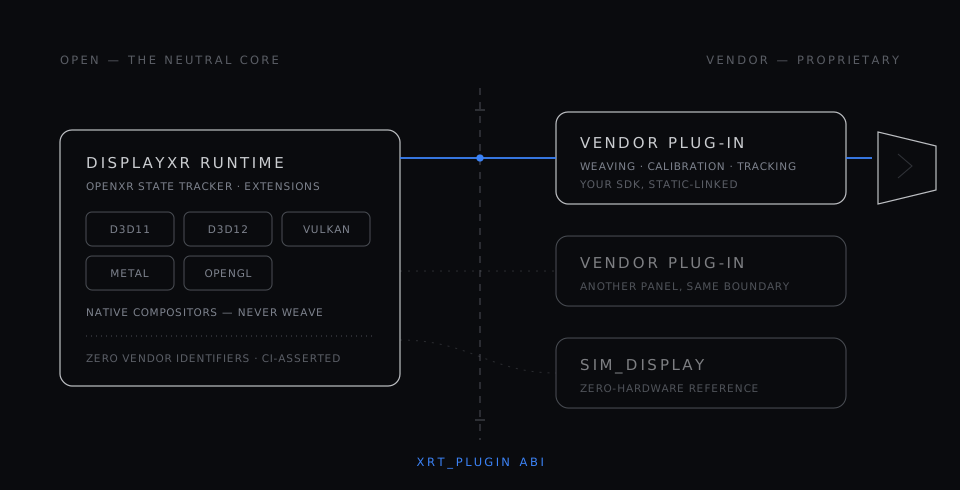
DisplayXR is vendor-neutral. Any 3D-display maker can ship a display-processor plug-in from their own repo — and any tracking-hardware maker can ship an input provider. The runtime discovers and loads both at startup. You never fork the runtime.
The plug-in model
A vendor integration is a display-processor plug-in — a dynamically-loaded library that turns the rendered stereo pair into whatever a specific panel needs (lenticular weaving, interlacing, calibration) and feeds the runtime its display geometry and tracked eye positions. It ships from your repo with your installer, on your release cadence.
This is the model as of ADR-019 (issues #256 / #263). Earlier builds linked vendor drivers into the runtime tree; that approach is retired. The shipped runtime carries zero vendor SDK identifiers in its link line.
The same line is drawn inside windowed weaving. Whoever owns the placement of the drawn region — the app, the runtime, or a Wayland compositor — tells your plug-in where that region landed, as a plain panel-space position anyone could observe. Turning position into an interlacing phase is yours alone: snapping, quantization, and everything else that needs lens pitch, slant, or subpixel layout stays inside your binary and never crosses the ABI (ADR-033).
How discovery works
At xrCreateInstance the runtime enumerates registered plug-ins, loads each in probe order, and the first one whose hardware is present wins. The built-in sim_display plug-in sits last and always loses to real hardware.
Windows
Your installer registers the plug-in under HKLM\Software\DisplayXR\DisplayProcessors\<id> with a probe order and an uninstall string.
macOS / Linux
A JSON manifest in the DisplayProcessors search path points at your .dylib / .so, with the same probe-order semantics.
What you implement
One exported symbol — xrtPluginNegotiate — returning an xrt_plugin_iface that the runtime calls for:
- probe — is your hardware present?
- display info — panel dimensions, eye-tracking mode (MANAGED or MANUAL).
- display-processor factories — one per graphics API you support (D3D11, D3D12, Vulkan, Metal, OpenGL). The compositor calls your
process_atlaseach frame; it never weaves itself.
Your vendor SDK is static-linked into the plug-in only. Zero compositor changes are required.
Input providers
Displays are not the only hardware that plugs in. An input provider is a second, independent plug-in type that surfaces tracked motion controllers — or hands, or generic trackers — from an external tracking source into the standard OpenXR action system. Unmodified OpenXR apps consume them through xrSyncActions with no idea where the poses came from.
It is deliberately not an extension of the display-processor vtable. Input providers have their own entry point (xrtInputPluginNegotiate), their own ABI version, and their own discovery root, so a tracking-hardware maker ships one without touching the display side — and a display vendor is never obliged to implement input. Discovery, probe order, and ABI gating mirror the display-processor loader, so everything you learn from one applies to the other.
A provider exposes N devices, each self-describing its type and claimed interaction profile, with pose, buttons, and haptics. If a provider supplies a left/right pair it claims those roles; otherwise the keyboard-emulated fallback fills them. The runtime ships a reference provider plus a loopback-TCP one with a documented wire protocol, so you can drive the action system from any language before committing to a native plug-in.
ADR-034: Input Provider Plug-ins →
Why input is a second plug-in type rather than a vtable extension, the negotiation contract, role arbitration, and the wire protocol.
Start from the template
The vendor plug-in template is a buildable, ABI-correct starter kit that requires no vendor SDK at all. Clone it, rename the example driver to your own, and replace one function — the weave. It builds green before you touch it, so the first thing you see is a working pixel path rather than a build error.
The Leia SR plug-in is a complete, shipping integration and the worked example to read — a real weaver, eye-tracking listener and installer in one place. It builds against a proprietary vendor SDK, so it is a reference rather than a starting point.
What the first plug-in actually costs
- Two mandatory vtable slots out of ~19 —
process_atlasanddestroy— every other slot is optional and NULL-safe, so you implement only what your product needs. - About a week of DisplayXR plumbing for a competent engineer: negotiate, probe, create the device, report display info, installer and registration.
- Your weaver and calibration stay yours. They are your own work, static-linked inside your binary, and they never cross the ABI.
- You ship a library and an installer from your own repo on your own cadence, and never fork the runtime.
Bring your display to DisplayXR
Building a spatial display and want it to run the existing library of DisplayXR content? We'll help you scope a plug-in and get your hardware onto the platform. A second independent vendor is also the milestone that moves the project toward shared, multi-vendor governance — get in touch early.