OpenXR for Spatial Displays
Write once. Run on any spatial display. DisplayXR is an open platform for spatial displays — OpenXR extension specifications, a reference runtime, and reference implementations — for tracked stereo and multiview lightfield 3D, portable across engines, graphics APIs, and vendor hardware.
The Problem
The hardware is solved. The ecosystem is not.
OpenXR standardized how applications talk to headsets and controllers. But a growing category of spatial displays — tracked spatial display monitors, laptops, and related systems — has no equivalent.
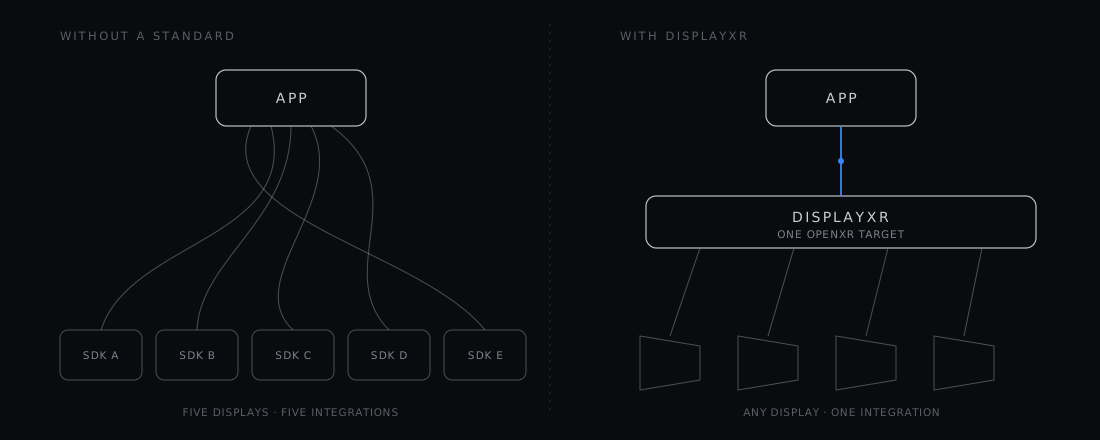
Today, every vendor ships its own SDK with its own compositor, its own rendering path, and its own way of handling eye tracking and display geometry. So the bottleneck in this category is not the optics. It is content, and the reason is arithmetic:
A developer has to author it again for every display. Nobody does that four times, so most do it zero times. A display vendor has to ship an entire authoring toolchain with its panel — a runtime, an SDK, a content pipeline, developer relations — or ship a panel with nothing to run on it. Neither cost scales, and both are paid over and over for the same result.
What DisplayXR Provides
A practical stack for tracked spatial displays
Runtime
A full OpenXR runtime with native compositors for every major graphics API — no interop layers required.
Extension Specs
Custom OpenXR extensions for display info, window bindings, and spatial display capabilities not covered by standard OpenXR.
Native Compositors
Per-graphics-API compositors (D3D11, D3D12, Vulkan, Metal, OpenGL) that avoid cross-API translation overhead.
Engine Integrations
Unity plugin shipping with UPM support. Unreal plugin in beta (UE 5.7). Standard engine workflows, no custom forks.
Vendor Plug-ins
Two independent plug-in types, discovered at startup, neither touching app code: a display processor for vendor-specific weaving, interlacing and calibration, and an input provider that surfaces tracked motion controllers, hands, or trackers into the standard OpenXR action system.
Workspace Extensions
XR_DXR_spatial_workspace + *.displayxr.json launcher manifests — a documented surface for swappable workspace controllers that compose multi-app 3D layouts, drive window placement, and surface launcher tiles. The DisplayXR Shell is the reference; OEMs, vertical integrators, kiosks, and AI-agent drivers can ship their own.
Things you can check
Zero
vendor identifiers in the shipped runtime
Neutrality is enforced in the binary, not promised in a policy document. The compositor never weaves; the display processor always does, behind a plug-in ABI — and CI fails any change that puts a vendor symbol in the runtime's link line.
Every release
runs the official Khronos OpenXR CTS
The conformance suite runs on pull requests as a smoke subset, and the full non-interactive suite nightly and on every release tag — hardware-free, against the simulated display.
No hardware
required to build for a spatial display
The runtime ships a simulated tracked panel in an ordinary 2D window, with the viewer's eye position on the mouse and keyboard. It is the same driver the conformance suite runs against.
Who is this for?
Three audiences, one stack
DisplayXR is layered so app developers, contributors, and hardware vendors can each pick up exactly the part they need without forking the rest.
The Ecosystem
More than a runtime
DisplayXR is developing as a full ecosystem — runtime, extensions, engine plugins, projection math, demos, and reference workspace controllers.
See it running
The DisplayXR Gallery is a live gallery of 3D photography: a curated set of stereo captures, woven natively in the DisplayXR Browser and degrading to a cursor-driven parallax preview in any other browser. It doubles as the reference for how an inline-3D page should behave — the same page serves both, with no separate 3D build.
Every photo carries per-eye depth, so a Depth view can turn any shot into its own depth map. On a 3D display that view stays dimensional rather than flattening into a picture of a depth map — which is the difference the format is for.
Core
displayxr-runtime
Core OpenXR runtime with native compositors for D3D11, D3D12, Vulkan, Metal, and OpenGL — on Windows, macOS, and Android, plus a Vulkan-only compositor on desktop Linux, native on Wayland (shipping as .deb packages).
displayxr-extensions
OpenXR extension specs and headers for tracked spatial display capabilities.
Engine Plugins
displayxr-unity
ActiveUnity engine plugin (UPM package) with eye-tracked stereo rendering, sample scenes, and standalone editor preview.
displayxr-unity-samples
ActiveReady-to-open Unity sample projects — Built-in/URP/HDRP pipeline tests plus a transparent Desktop Avatar showcase — wired to the DisplayXR Unity plugin, with one shared installer. Consolidates the earlier per-feature test repos into a single monorepo.
displayxr-unreal
BetaUnreal Engine plugin (UE 5.7) with eye-tracked Kooima stereo, camera- and display-centric rigs, Blueprint components, material expression nodes, and zero-copy atlas handoff. Windows, macOS, Android.
Libraries
displayxr-common
Shared math and common library — off-axis (Kooima) projection, atlas tiling, and window/canvas helpers — including one Linux app window that picks native Wayland or X11 by capability probe, with shared client-side window chrome — consumed by the runtime, engine plugins, and demos from a single source of truth.
displayxr-mcp
ActiveTiny embeddable Model Context Protocol server framework, plus the DisplayXR MCP Tools installer that end users download to opt in to AI-agent / voice control. The framework lets the runtime, the reference shell, and any third-party workspace controller expose live spatial state and control to AI agents (Claude Code, voice CLIs, custom drivers); the installer writes a registry capability flag the runtime and shell read at startup.
displayxr-vendor-template
EarlyVendor-neutral starter kit for building a DisplayXR display-processor plug-in — the ABI, discovery, and build scaffolding a new 3D-display maker needs, with no vendor SDK required. Fork it to bring up a plug-in against the sim_display path, then swap in your own weaver.
displayxr-cef-host
ExperimentalThe original proof that XR_DXR_weave works — not a browser to use, which is DisplayXR Browser. A small CEF (Chromium Embedded Framework) offscreen-render app that hands the runtime a stereo texture and a window rect and composites the weaved result; it never weaves itself. Kept as the smallest worked example of driving the weave from your own present-owner without forking Chromium, and because it builds in minutes where the browser fork takes hours. Note that it is pinned to weave spec v1 while the runtime is on v9, so it does not exercise batched submit, the 2D overlay atlas, N-view input, the Android handle kinds, or IPC brokering — treat it as a starting point to read, not a current conformance harness.
Demo Applications
displayxr-demo-gaussiansplat
ActiveReal-time 3D Gaussian Splatting viewer (.spz / .ply) for spatial displays. Windows, macOS, Linux, Android.
displayxr-demo-modelviewer
ActiveGlasses-free 3D glTF 2.0 PBR model viewer (OpenXR + Vulkan). Drag-and-drop a .glb / .gltf model. Windows, macOS, Linux, Android.
displayxr-demo-mediaplayer
ActiveSpatial media player — stereo photos, GPU-decoded video with synchronized audio, and folder slideshows, with playback controllable by AI agents. Windows, macOS, Linux, Android.
displayxr-demo-avatar
ActiveA transparent, click-through 3D avatar that floats over your desktop (OpenXR + native Vulkan) — weaved in 3D with a flat 2D speech bubble beside it, and clicks passing through to whatever is behind. Showcases the see-through transparency and mixed 2D/3D display-zone path, now with live desktop content composited under the weave on all four platforms.
displayxr-demo-earthview
BetaStreaming glasses-free 3D city viewer on Google Photorealistic 3D Tiles (OpenXR + Vulkan). Fly the full-scale world camera-style, or double-click to frame a neighborhood as a tabletop diorama. Requires a Google Map Tiles API key.
displayxr-web
ExperimentalInline-3D web samples and the JS helper library for the DisplayXR Browser — the DisplayXR analog of the webxr-samples gallery, served via GitHub Pages.
Workspace Controllers
displayxr-shell-releases
ActiveReference spatial workspace controller — a 3D window manager with multi-app compositing, 2D window capture, dynamic layouts, and focus-adaptive rendering. Windows, with a macOS build in beta. Ships as a standalone installer; build your own controller for verticals, kiosks, or OEM-branded workspaces using the same extension surface.
displayxr-browser
ActiveDisplayXR Browser — a Chromium that renders the web normally and weaves glasses-free inline 3D on DisplayXR hardware, on Windows and Android. The productization of the inline-3D browser work validated by the CEF host, with a GPU-resident weave (no per-frame CPU readback). Security updates follow Chrome stable: every Chrome stable point release is rebuilt and published automatically when the browser's own code is untouched upstream, and verified on a DisplayXR display first when it is not. Pinned in the org version matrix as `browser`, and installable via the dev orchestrator with `--with browser`; it is deliberately not in the all-in-one bundle, because a full standalone browser is not part of the display stack the default install lays down.
Why Now
Spatial computing is not headset-only
Spatial computing is still largely framed around headsets. But spatial displays are becoming a real category — tracked spatial display monitors, laptops, and Android devices are already shipping from Samsung, Acer, Lenovo, ZTE, and Barco, with more vendors on the way.
These devices need a common interface layer. Without one, the ecosystem fragments before it has a chance to grow. DisplayXR brings that missing layer, so developers and hardware vendors can build against a shared interface rather than isolated SDKs.
The end goal is not a parallel standard — it's the standard. The 3D-display extensions ship under the project's own DXR author tag, registered with Khronos in July 2026, and are designed to be upstreamed as cross-vendor KHR extensions — with DisplayXR as the open reference implementation, validated against the official OpenXR conformance suite on every release. An app written once runs on any spatial display, exactly as OpenXR did for headsets.
Recently Shipped
What’s new
Try it. Fork it. Ship it.
Try the runtime in simulation with no hardware at all. Fork a reference demo and swap in your own content. Or write a plug-in and bring your display to the platform — no licence, no fee, no permission.